---
title: GoToAssist Unattended Installation instructions
description: AccuTest Standard Remote Access Tool GoToAssist
---
[Skip to content](https://knowledge-base.kti.cc/knowledge/goto-assist-unattended-installation-instructions#main-content)
English
Show submenu for translations
[Submit a Support Request](https://knowledge-base.kti.cc/knowledge/kb-tickets/new?hsLang=en) [Customer portal](https://knowledge-base.kti.cc/accutest-kiss-tickets?hsLang=en)
![accutest-logo.jpg\]](https://knowledge-base.kti.cc/hs-fs/hubfs/AccuTESTSystems_December2018%20Theme/Image/accutest-logo.jpg?height=40&name=accutest-logo.jpg)
- [Default HubSpot Blog](https://kti-4953342.hs-sites.com/blog)
Open main navigation
Close main navigation
- [Default HubSpot Blog](https://kti-4953342.hs-sites.com/blog)
- English
Show submenu for translations
- [Submit a Support Request](https://knowledge-base.kti.cc/knowledge/kb-tickets/new)
- [Customer portal](https://knowledge-base.kti.cc/accutest-kiss-tickets)
- Contact us
Contact us
Hello. How can we help you?
- There are no suggestions because the search field is empty.
1. [AccuTEST / Kiss Technologies Help Center](https://knowledge-base.kti.cc/knowledge?hsLang=en)
2. [Service and Support](https://knowledge-base.kti.cc/knowledge/service-and-support?hsLang=en)
# GoToAssist Unattended Installation instructions
## AccuTest Standard Remote Access Tool GoToAssist
[GoToAssist Remote access tool.](https://knowledge-base.kti.cc/hubfs/GoToAssist_Remote_Support_Unattended_AccuTEST%20(2).exe?hsLang=en)
Please click the above link, this will initiate a download of a remote access tool comes standard on AccuTest machines. For the purposes of connecting to a machine that doesn't have the remote access application installed on it before.
Clicking the link will net a new downloaded file.
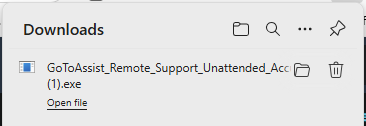
All you have to do is run the executable when the download finishes, and that's all. We will see the machine on our remote access tool and only need confirmation to access local files on the machine during the remote session.
- [Product Catalog](https://knowledge-base.kti.cc/knowledge/product-catalog?hsLang=en#main-content)
- [AccuTEST System SL](https://knowledge-base.kti.cc/knowledge/product-catalog?hsLang=en#accutest-system-sl)
- [FAQ's](https://knowledge-base.kti.cc/knowledge/faqs?hsLang=en#main-content)
- [Product](https://knowledge-base.kti.cc/knowledge/faqs?hsLang=en#product)
- [Service and Support](https://knowledge-base.kti.cc/knowledge/service-and-support?hsLang=en)
- [Default HubSpot Blog](https://kti-4953342.hs-sites.com/blog)
[](https://knowledge-base.kti.cc/knowledge?hsLang=en)
AccuTEST Help Center
Copyright © 2026, Kiss Technologies - AccuTEST Systems