---
title: How to add Company Logo and Company information to Report Page (ATS)
description: This guide will help the user add an image and fill out company information that should populate the report page.
---
[Skip to content](https://knowledge-base.kti.cc/knowledge/company-logo-info-to-report#main-content)
English
Show submenu for translations
[Submit a Support Request](https://knowledge-base.kti.cc/knowledge/kb-tickets/new?hsLang=en) [Customer portal](https://knowledge-base.kti.cc/accutest-kiss-tickets?hsLang=en)
![accutest-logo.jpg\]](https://knowledge-base.kti.cc/hs-fs/hubfs/AccuTESTSystems_December2018%20Theme/Image/accutest-logo.jpg?height=40&name=accutest-logo.jpg)
- [Default HubSpot Blog](https://kti-4953342.hs-sites.com/blog)
Open main navigation
Close main navigation
- [Default HubSpot Blog](https://kti-4953342.hs-sites.com/blog)
- English
Show submenu for translations
- [Submit a Support Request](https://knowledge-base.kti.cc/knowledge/kb-tickets/new)
- [Customer portal](https://knowledge-base.kti.cc/accutest-kiss-tickets)
- Contact us
Contact us
Hello. How can we help you?
- There are no suggestions because the search field is empty.
1. [AccuTEST / Kiss Technologies Help Center](https://knowledge-base.kti.cc/knowledge?hsLang=en)
2. [Service and Support](https://knowledge-base.kti.cc/knowledge/service-and-support?hsLang=en)
# How to add Company Logo and Company information to Report Page (ATS)
## This guide will help the user add an image and fill out company information that should populate the report page.
By: Corey Walcott
#### When an AccuTEST system reporting needs to be updated with new company information or create a new Company Information document object.
Go to your populated test list after completing a test.
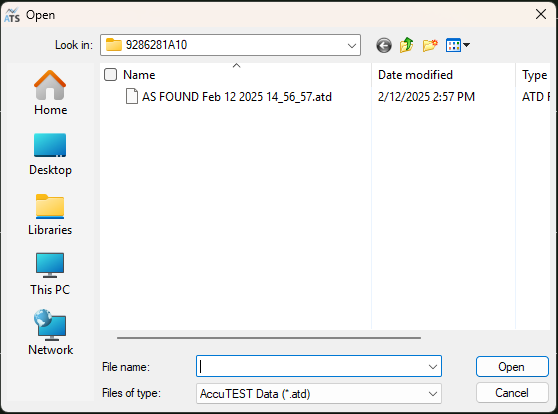
Select your report options.
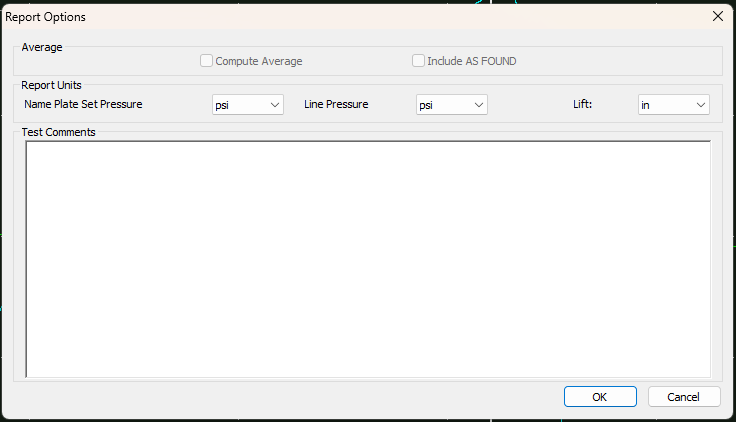
If your company information is incomplete or is not populated, you will see the following in your report preview.

Go to Setup, Choose "Company Information" then fill in the forms to the best of your ability.
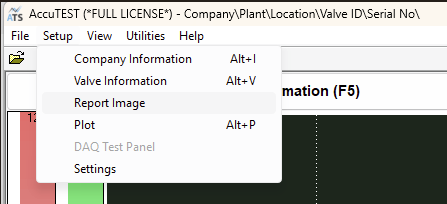
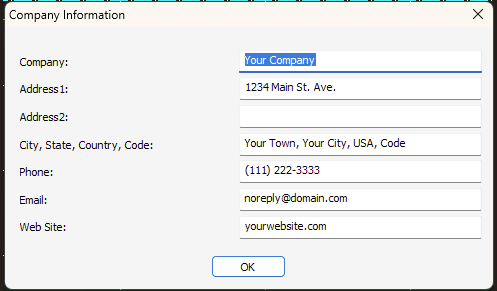
For the company image, please copy the saved location to the AccuTEST folder for ease of use, otherwise, you can browse and find the image file location from the "Report Image" option.

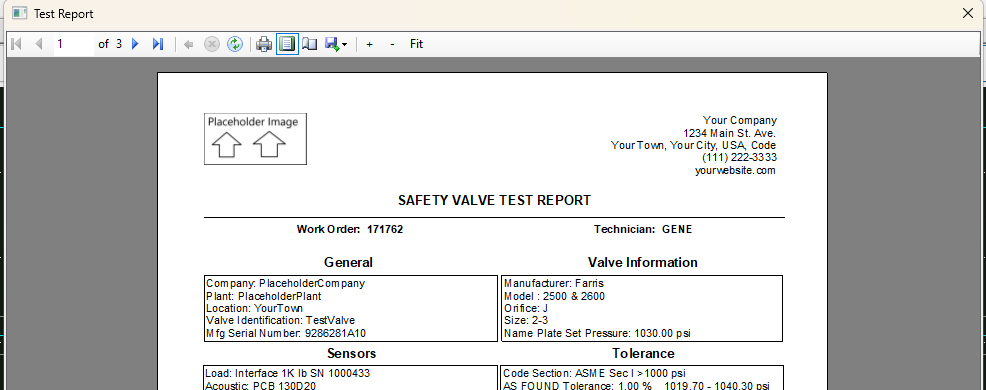
After selecting your Report Image. retry the report print preview (Report (F9)) and you should see the reflections as follows:
***If you have any questions, comments or concerns regarding this guide, please email [support@accutestsystems.com](mailto:support@accutestsystems.com).***
- [Product Catalog](https://knowledge-base.kti.cc/knowledge/product-catalog?hsLang=en#main-content)
- [AccuTEST System SL](https://knowledge-base.kti.cc/knowledge/product-catalog?hsLang=en#accutest-system-sl)
- [FAQ's](https://knowledge-base.kti.cc/knowledge/faqs?hsLang=en#main-content)
- [Product](https://knowledge-base.kti.cc/knowledge/faqs?hsLang=en#product)
- [Service and Support](https://knowledge-base.kti.cc/knowledge/service-and-support?hsLang=en)
- [Default HubSpot Blog](https://kti-4953342.hs-sites.com/blog)
[](https://knowledge-base.kti.cc/knowledge?hsLang=en)
AccuTEST Help Center
Copyright © 2026, Kiss Technologies - AccuTEST Systems